GPU Rental in 2026: RunPod vs Vast.ai vs SimplePod vs Clore.ai vs Vultr Prices Compared

More and more often you need a graphics card for just a few hours: to generate images in ComfyUI, run a large language model, fine-tune a neural network or render a scene. Buying an RTX 5090 right now is expensive and not easy, while renting one costs tens of cents per hour. I compared five services where you can rent a GPU: prices, payment, reliability and the catches.
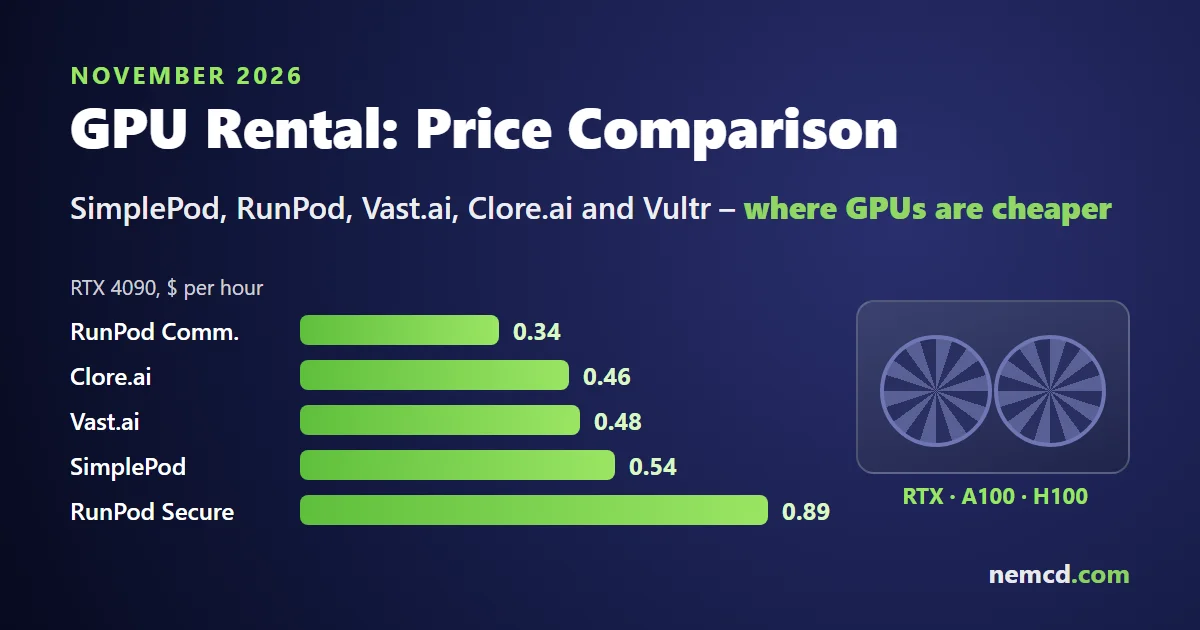
In short: the cheapest RTX 3090, 4090 and 5090 are on the Vast.ai and Clore.ai marketplaces, and among services with fixed pricing, the cheapest RTX 4090 is in RunPod’s Community Cloud at $0.34 per hour. If reliability matters, go with RunPod’s Secure Cloud. For A100 and H100, Vast.ai and RunPod’s Community Cloud are the cheapest, while Vultr fits when you need a large cloud provider. Prices change every day, so compare the card you need on two or three platforms before renting.
GPU rental prices
Prices per hour for one GPU, as listed by the services on November 17, 2026. For RunPod these are list prices, and for SimplePod the lowest prices of available cards. On the Vast.ai and Clore.ai marketplaces every host sets its own price, so the table shows the median: half the offers are cheaper, half are more expensive.
Consumer GPUs
| Service | RTX 3090 | RTX 4090 | RTX 5090 |
|---|---|---|---|
| SimplePod | $0.16 | $0.54 | $0.82 |
| RunPod Community | $0.22 | $0.34 | $0.69 |
| RunPod Secure | $0.50 | $0.89 | $1.39 |
| Vast.ai, median | $0.20 | $0.48 | $0.67 |
| Clore.ai, median | $0.19 | $0.46 | $0.71 |
SimplePod’s $0.54 RTX 4090 is in VPS mode; in Docker mode it starts at $0.79. On marketplaces the cheapest offers can be 2–3 times below the median: an RTX 4090 on Vast.ai starts at $0.27 and on Clore.ai at $0.12 per hour. But cheap hosts fail more often; more on that below.
Data center GPUs
| Service | A100 80 GB | H100 80 GB |
|---|---|---|
| RunPod Community | $1.19 | $1.99 |
| RunPod Secure | $2.09 | $2.89 |
| Vast.ai, median | $0.62 | $2.44 |
These are PCIe prices. SXM versions are faster and cost more: an H100 SXM on RunPod is $2.69 (Community) and $4.39 (Secure), and the Vast.ai median is $2.33. SimplePod offers the 80 GB A100 and the H100 by advance reservation, and Clore.ai has almost none of these cards. An RTX PRO 6000 Blackwell with 96 GB of memory costs $2.39 per hour on SimplePod, and half of one (48 GB) costs $0.49.
Rent or buy
The RTX 5090’s list price is $1,999, but in November 2026 you can’t buy one at that price: US stores sell it for about $6,900, and in Germany it costs over €5,000. With $6,900 you can rent an RTX 5090 in RunPod’s Community Cloud for 10,000 hours, which is more than a year of round-the-clock use. If you use the card 8 hours a day on weekdays, that’s almost 5 years. And that’s before the electricity bill: under load the RTX 5090 draws about 575 W.
Buying your own card makes sense if it’s busy almost all the time or you also want it for gaming. For neural networks, rendering and one-off jobs, renting is cheaper.
What a typical job costs
Calculated from the prices in the tables above, from the cheapest option to the most expensive.
| Job | Cost |
|---|---|
| 10 hours of image generation in ComfyUI on an RTX 4090 | $3.40 (RunPod Community) – $8.90 (RunPod Secure) |
| 8 hours with Llama 3.3 70B on an A100 80 GB | $4.96 (Vast.ai) – $16.72 (RunPod Secure) |
| 48 hours of model fine-tuning on an H100 | $95.52 (RunPod Community) – $138.72 (RunPod Secure) |
File storage isn’t included, but it’s usually a few dollars a month.
How much GPU memory you need
The key spec when choosing a card is video memory: the model has to fit into it with a little room to spare. For language models in compressed (quantized) form, as Ollama downloads them:
| Model | Suitable GPU |
|---|---|
| 7–9 billion parameters, ~7 GB | any card with 8 GB or more, an RTX 3060 will do |
| 27–31 billion parameters, 17–20 GB | RTX 3090 or 4090 (24 GB), RTX 5090 (32 GB) |
| Llama 3.3 70B, 43 GB | A100 80 GB, RTX PRO 6000 (96 GB) or two 24 GB cards |
More examples in my article on running AI locally with Ollama. If a model doesn’t fit into memory it will still run, but many times slower.
How the services differ
SimplePod
- Fixed prices, per-second billing, you pay only while the server is running.
- Ready-made templates: Ollama, ComfyUI, Stable Diffusion, Jupyter, PyTorch, so there’s no need to install drivers and CUDA.
- Two modes: a Docker container and a GPU VPS (Ubuntu or Windows, a public IP, the disk is kept after you stop it).
- The easiest start for a beginner. Details in my article on renting GPUs at SimplePod.
RunPod
- Two kinds of servers: Secure Cloud in data centers and the cheaper Community Cloud on third-party hosts’ hardware.
- Per-second billing, and no charges for inbound or outbound traffic.
- Persistent disk (volume) is billed separately: $0.10 per GB per month while the server runs and $0.20 per GB while it’s stopped.
- You can start with $10. Pay by card or cryptocurrency (identity verification is required before your first crypto payment).
- Lots of ready-made templates and a serverless mode for your own APIs.
Vast.ai
- A marketplace: data centers and individual hosts rent out their cards, and prices follow supply and demand. Almost 70 GPU models, from the RTX 3060 to the B200.
- Per-second billing, no minimum term.
- Interruptible servers are 50% or more cheaper than regular ones, but the host can take them back at any moment. They suit training jobs that save checkpoints.
- Reliability depends on the host: check its rating and uptime percentage.
Clore.ai
- A GPU marketplace, mostly consumer cards: RTX 3090, 4090, 5090 and others.
- Service fee: 5–10% for on-demand and 1.8–2.5% for spot rentals.
- Payment in CLORE tokens and bitcoin, with prices also shown in dollars.
- There’s a Clore Quick mode: you pick a task (chat, images, video, code), the service picks a GPU and installs everything, billed per minute.
- As with Vast.ai, check the host’s reliability before renting.
Vultr
- A large cloud provider with data centers around the world and data center GPUs: H100, A100, L40S and others.
- Hourly billing, with the usual cloud services alongside: disks, networking, load balancers.
- More expensive than marketplaces, but a good fit for production projects where stability matters.
Which one to choose for your task
- Try a neural network, ComfyUI or Ollama for a couple of hours: SimplePod or RunPod Community, with a clear interface and ready-made templates; an RTX 3090 or 4090 is enough to start.
- Run a large language model: pick the card by memory from the table above; for 70B, an A100 80 GB on Vast.ai or RunPod.
- Long training on a budget: Vast.ai interruptible servers, always with checkpoints.
- A production project or a service for clients: RunPod Secure Cloud or Vultr.
- You want to pay with crypto: Clore.ai or RunPod.
How to rent a GPU, step by step
The process is almost the same at all five services:
- Sign up and top up your balance. $10 is enough for a first try: that’s dozens of hours on an RTX 4090.
- Pick a template for your task: ComfyUI, Ollama, Jupyter, PyTorch. Then the drivers, CUDA and software are already installed.
- Pick a GPU by memory size, price and, on a marketplace, host reliability.
- Connect through the web interface, Jupyter or SSH. The service shows the connection link on the server’s card.
- Save your results to a persistent disk or download them.
- Stop or delete the server when you’re done, or billing will continue.
How not to overpay
- Stop and delete servers. You pay while the server is running, even if the GPU sits idle. The most common overspend is a server forgotten overnight.
- Count the disk. Models and datasets take tens of gigabytes, and many services bill storage separately, including while the server is stopped.
- Debug on a cheap card. Set up your environment on a card at $0.05–0.20 per hour and move to an RTX 5090 or H100 once everything works.
- On a marketplace, choose the host by reliability, not just price: the cheapest host may vanish in the middle of your job.
- Compare the price per result, not per hour. In RunPod’s Community Cloud the RTX 5090 costs about twice as much as the 4090, so if your job runs twice as fast on it, the total bill is the same and you save time.
FAQ
Is it safe to upload my data?
On marketplaces (Vast.ai, Clore.ai, RunPod Community) the server belongs to a third-party host who has physical access to the hardware. For confidential data choose RunPod Secure Cloud or Vultr, don’t keep passwords and keys on a rented server, and delete the server when you’re done.
What happens if my balance runs out?
The service stops the server, and the data on its disk may be deleted after a while. Before a long job, top up with some margin or turn on auto top-up if the service has it.
Why is the marketplace price lower than in the table?
The table shows the median. The cheapest offers usually come from hosts with a low rating, slow internet or a weak CPU. For an important job it’s worth paying a couple of cents more per hour.
Can I pay without a bank card?
Yes: Clore.ai accepts CLORE and bitcoin, and RunPod accepts cryptocurrency after verification.
I rent GPUs on Vast.ai and Clore.ai myself for my own compute jobs: for work that runs for several days it’s noticeably cheaper than buying cards. For experimenting with neural networks, SimplePod and RunPod are the most convenient.
The links to SimplePod, RunPod, Vast.ai, Clore.ai and Vultr are referral links: signing up through them costs you nothing, and the blog gets a small reward.