GetThemeTransitionDuration Not Found in UxTheme.dll — Viber Install Error on Windows XP

Time goes by, Viber keeps updating and getting “heavier”, while old phones and ancient computers creak their gears and weep bitter tears.
When installing the new Viber on Windows XP, I got this error: “The procedure entry point GetThemeTransitionDuration could not be located in the dynamic link library UxTheme.dll”.
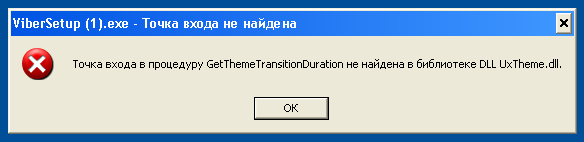
In short: the regular Viber for Windows doesn’t support Windows XP. You need the separate Viber version for XP — its link was at the bottom of the Viber download page.
Why the error appears
The GetThemeTransitionDuration function simply doesn’t exist in the Windows XP UxTheme.dll — it appeared in newer versions of Windows. The new Viber uses it, so it won’t run on XP. Downloading separate DLLs or installing Windows updates won’t help — you need a different version of Viber itself.
The fix: Viber for Windows XP
It turns out you have to look very carefully: at the bottom of the Viber download page, in small print, there were versions for less popular systems — Windows XP, several Linux distributions and old macOS.

After downloading the right version, Viber installed and worked without problems.
If the error persists after downloading the XP version, you’re most likely running the old file. Download the installer again into a separate folder and run it from there.
Update
According to readers, the Windows XP version later disappeared from the download page, and a previously downloaded copy (6.0.1.5) stopped logging in after you enter your phone number. So Viber effectively no longer works on XP: your options are Viber on your phone or moving to a newer Windows.