How to Recover Deleted Google Drive Files After Emptying the Trash
However careful you are, there’s always a small chance that something goes wrong.
Today I was tidying up my Google Drive and deleting everything in sight, knowing I had an up-to-date copy in another cloud. I kept only the documents where I keep working notes. I deleted almost everything, emptied the trash and happily moved on to other things.

In short: if you use Google Workspace (G Suite, email on your own domain), an admin can restore deleted files even after the trash is emptied — in the Admin console, usually within about 25 days. If it’s a personal account, contact Google Drive support as soon as possible.
How I wiped out an important file
Twenty minutes later I noticed that an open spreadsheet wanted to refresh — and realized I had deleted it too. It was a shock: the backup was in another cloud, but the latest version lived only in Google Drive. I managed to copy the data from the one open sheet, but when I switched to the other sheets, Google Drive said the document had been deleted.
I had emptied the trash completely. That was the fatal mistake. Don’t empty the trash manually: files are removed from it automatically after 30 days, and until then you can restore them with one click.
It seemed hopeless: everyone knows that once the trash is emptied, files are gone. But Google made it possible to restore deleted files even when they’re no longer in the trash.
The fix for Google Workspace (G Suite)
This method works if you use Google Workspace (formerly G Suite, Google Apps), i.e. Google email runs on your own domain. That was my case.
- Sign in to the Google Admin console as an administrator.
- Find the user and choose More → Restore data.

- Choose the date range when the files were deleted and the Drive application, confirm and wait.

About 15 minutes later folders started appearing in Google Drive — it was working. The speed depends on how many files were deleted: with large volumes, the restore can take several days. Everything deleted within the chosen dates is restored, not a single file.
It worked. This only restores files that were permanently deleted no more than about 25 days ago — don’t put it off.
If you have a regular Google account
Without your own domain you don’t have this tool. For this case Google’s help advises contacting support:
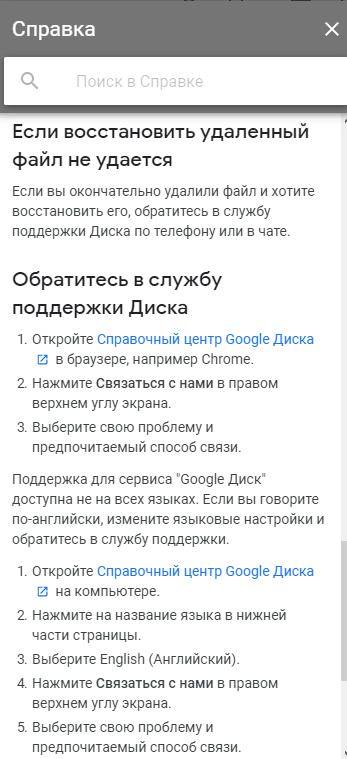
I haven’t used this route myself, but according to readers’ comments it works: support restored files deleted 20 days earlier for one reader, and for another it took 5 minutes through the English-language Google Drive support chat. The key is to reach out as quickly as possible.
Tell us in the comments whether you managed to restore a file from an emptied Google Drive trash.