PCIe to M.2 NVMe Adapter: How to Choose, Options and Cooling

In local computer stores, M.2 SSD adapters (for motherboards that don’t have a built-in M.2 slot, or when all slots are already occupied) often cost an unreasonably high amount of money. For a quick initial setup, I bought the simplest barebones PCIe to M.2 adapter to test my drive, but for daily heavy workloads, proper cooling is a must.

You basically have a few options: buy a standalone heatsink separately, overpay at a local retail store, buy from local resellers on classifieds sites, or order a well-built adapter with a heatsink directly from AliExpress.
While you can find decent budget adapters on local classifieds that look better and cost less than retail stores, you still have to either meet the seller in person or pay extra for shipping—plus a reseller markup and no buyer protection.
Since my NVMe SSD was already up and running in the temporary adapter, I wasn’t in a rush and decided to pick a solid cooled adapter on AliExpress. Here is a breakdown of the most interesting options by price and cooling configuration.
Basic PCIe to M.2 Adapters Without a Heatsink ($3.50–$5)
1. Simple, Affordable PCIe M.2 Adapter — $3.51
Clean perforation on the rear bracket helps warm air escape the PC case, and it includes a spare low-profile bracket for small form factor (SFF) builds.

2. Standard Barebones Adapter — $4.12
Virtually identical to the first option, slightly more expensive and without the extra low-profile bracket, yet still less than half the price of local retail stores.

3. Sleek All-Black Bracket Adapter — $4.96
Features a clean black PCB and black mounting bracket. A great pick if your M.2 SSD already came with its own heatsink or runs cool enough without one.

PCIe to M.2 Adapters With Passive Heatsink Cooling ($4.50–$10)
High-speed NVMe SSDs easily exceed 70 °C under sustained file transfers or heavy workloads and start thermal throttling. Choosing an adapter bundled with an aluminum heatsink and thermal pads is much more practical.
4. Bracketless Compact Adapter With Bundled Heatsink — $4.47
An ultra-compact half-height card without a rear PCIe bracket, bundled with a finned aluminum heatsink, thermal pad, and mounting clips.

5. Full-Cover Shroud Heatsink Adapter — $8.07
This model stands out with a large aluminum heatsink shroud that encloses the entire SSD and PCB like a cooling sarcophagus.

The package includes a screwdriver, both standard and low-profile brackets, thermal pads, and mounting screws:

A very solid kit! Depending on whether your M.2 drive is single-sided or double-sided, you may want to adjust the thermal pad thickness to ensure firm contact between the heatsink and the controller chip.
6. JEYI SK4-Top (SEA SHARK PRO) Heavy Heatsink Adapter — $9.99
A higher-profile adapter featuring a beefy finned aluminum block branded SEA SHARK PRO.

I was just about to order this exact model—until I spotted option #7!
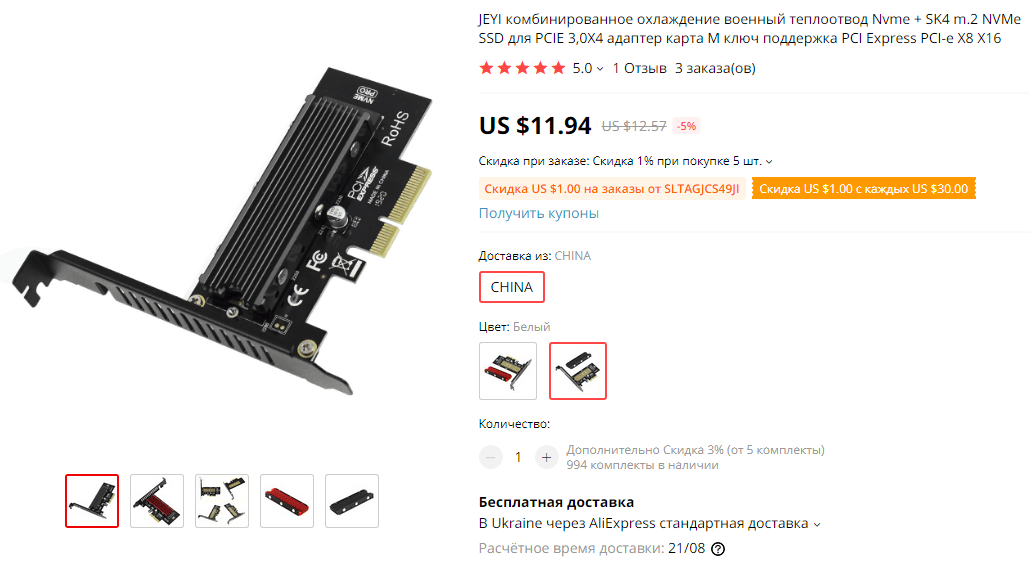
7. My Choice — JEYI SK4 Combined Finned Heatsink + NVMe Adapter
This turned out to be my favorite design. The ventilated PCB combined with a deeply finned aluminum heatsink looked great and offered much larger surface area for airflow inside the case. I ordered it right away using a cashback service.
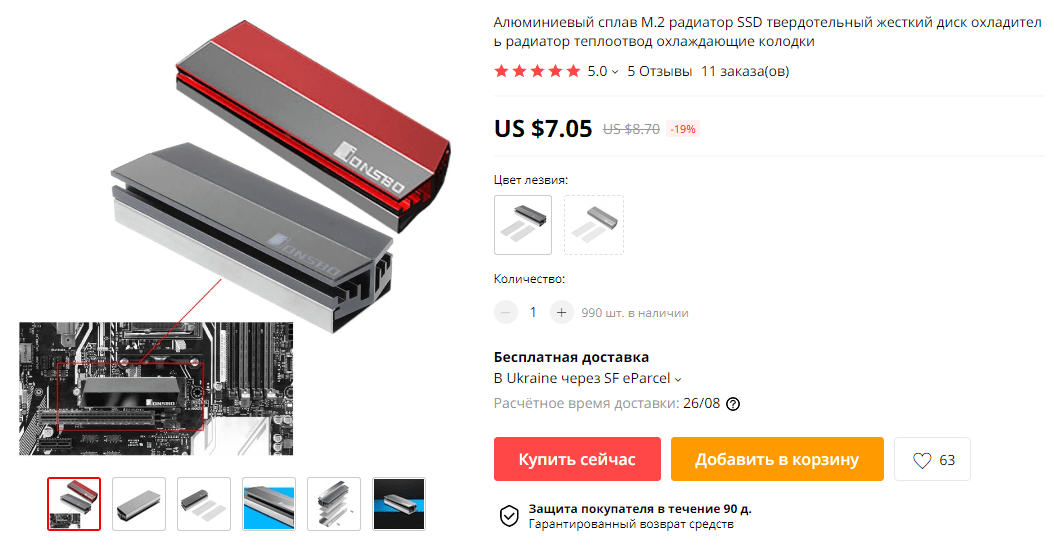
Here is a close-up of the multi-fin aluminum heatsink itself:

You can also buy this heatsink separately (around $7.05) and mount it onto an existing M.2 drive or basic adapter, though buying the complete bundle is more convenient:
PCIe to M.2 Adapter With Active Fan Cooling
8. Flagship JEYI KNIGHT Full-Length Card With Heatsink and Active Fan
The top-tier option featuring a full-size PCB, aluminum shroud, and a built-in blower/axial cooling fan:

While active cooling can shave off a few extra degrees, I wanted to avoid the high-pitched noise that small fans often develop over time, so I stuck with passive cooling. If extra airflow is ever needed, placing a quiet 120mm case fan near the motherboard expansion slots is both quieter and more reliable.
Quick Checklist Before Buying
- NVMe drives only: standard passive PCIe adapters (M-key) work only with M.2 PCIe NVMe SSDs. M.2 SATA drives require a different adapter that connects to a motherboard port via a SATA cable.
- Slot & speed: install the adapter into a PCIe x4, x8, or secondary full-length x16 slot. On PCIe 3.0 boards you get full speed (3200–3500 MB/s); on older PCIe 2.0 boards you get around 1600–1700 MB/s (still 3x faster than SATA SSDs).
- Booting Windows: as a secondary drive for games and files, it works out of the box on any PC. To use it as a boot drive on older motherboards (LGA 1155/1150, AM3+), check that your BIOS supports NVMe booting.
If your motherboard lacks an M.2 slot (or your primary slot is already populated, as later happened on my MSI B560M PRO motherboard with a built-in M.2 heatsink), a PCIe to M.2 NVMe adapter is an inexpensive and reliable upgrade. Even on older PCIe 2.0 boards, an NVMe drive is much faster and more modern than standard SATA SSDs!