Sometimes when you open a PDF link inside Google Chrome, instead of the document pages you get a blank gray screen that never finishes loading – even though the exact same PDF opens instantly in an Incognito window.

When I first ran into this, clearing cache and cookies, disabling hardware acceleration, and even reinstalling Chrome failed – the moment I signed back into the Google profile and sync finished, the gray PDF screen came right back. Below is the fix that solved it for me, plus the other common causes in current versions of Chrome.
Read full article →
Banking software usually has its quirks: sometimes it needs an old Java, sometimes a new one. Sometimes the new Java turns out to be too new. Sometimes the browser supports Java plugins, and then newer versions drop them completely. It’s more about Java itself, but that’s the developers’ choice.

Once I was asked to find Firefox 52.3.0esr — that exact version and no other. Fine, I offered to help — and was pleasantly surprised.
Read full article →
However careful you are, there’s always a small chance that something goes wrong.
Today I was tidying up my Google Drive and deleting everything in sight, knowing I had an up-to-date copy in another cloud. I kept only the documents where I keep working notes. I deleted almost everything, emptied the trash and happily moved on to other things.

In short: if you use Google Workspace (G Suite, email on your own domain), an admin can restore deleted files even after the trash is emptied — in the Admin console, usually within about 25 days. If it’s a personal account, contact Google Drive support as soon as possible.
Read full article →
Should you keep personal documents and backups on everyday Google Drive, Dropbox, or OneDrive? They are fast and convenient, yet by default the provider holds the encryption keys to your files. If you want true end-to-end (zero-knowledge) encryption where even the company running the servers can’t read your folders, you need to be pickier.

After trying a wide range of storage providers over the years, here are my honest notes on the services that stood out – updated for what actually makes sense today.
Read full article →
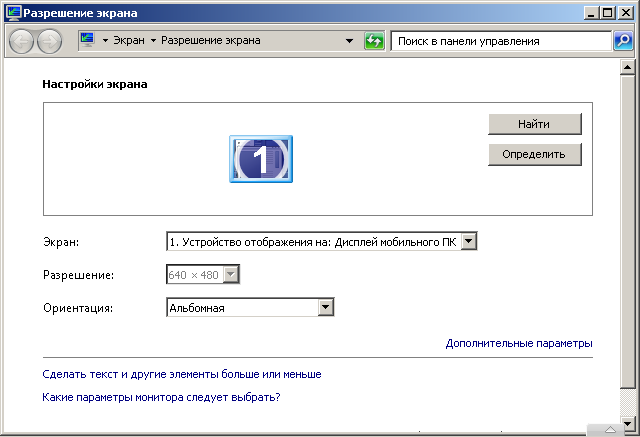
Here is the classic headless-PC annoyance: you remote into a home server or monitor-less Windows desktop over TeamViewer, AnyDesk, or RustDesk, and the screen is locked to a tiny 640×480 resolution.

Trying to work at 640×480 is miserable: dialog boxes overflow off the bottom edge, Apply/OK buttons vanish off-screen, and Windows Display Settings grays out every higher resolution. Below is why this happens and four practical ways to get full 1080p back.
Read full article →