Back Up FreeBSD to Windows: cwRsync, Cygwin, ExpanDrive and Robocopy
As everyone knows, there are two kinds of admins: those who make backups, and those who are about to start making backups :-).

I never had problems creating Windows-to-Windows backups, because I discovered the wonderful utility Robocopy, which, by the way, comes with Windows Vista, Windows 7, and Windows 2008.
For a long time I had been planning to set up a backup from FreeBSD to Windows. FreeBSD-to-FreeBSD was enough for me (I used rsync), but I wanted FreeBSD to Windows. I knew in theory that there is a Windows version of rsync from Cygwin.
The New Year holidays gave me a chance to sort this out, among other things.
Some surfing showed that cwRsync for Windows, with SSH as the transport and key-based authentication, makes it possible to back up from Linux to Windows, which is great.
I downloaded cwRsync 4.0.4, installed it on Windows XP, and wrote a sync.cmd file with this content:
SETLOCAL
SET CWRSYNCHOME=%PROGRAMFILES%\CWRSYNC

SET CYGWIN=nontsec
SET HOME=%HOMEDRIVE%%HOMEPATH%

SET CWOLDPATH=%PATH%
SET PATH=%CWRSYNCHOME%\BIN;%PATH%

rsync --progress -avz --delete -e "ssh -p 22" user_name@server_name:/data /cygdrive/c/data_b/
I think the idea is clear; you can read the rsync manual for the other switches. Note that ssh -p 22 means using SSH as the transport. I used the standard port, but if yours is different, change it. As for what goes where, there should be no questions.
Now, this example script uses password authentication and requires typing the password every time, which of course doesn’t work for unattended backups. But I ran into a bigger limitation of cwRsync: it can’t handle file names and full paths longer than 255 characters!
That killed all my attempts with cwRsync, so I didn’t bother setting up key authentication.
Further searching showed that the problem with UTF-8 and long file paths had existed for a long time. The first was solved by replacing the cygwin1.dll library, the second by some patch, but all the discussions dated back to around 2008. I found cygwin1.dll and replaced it, but rsync stopped starting. Then I installed Cygwin itself and installed rsync in it. By the way, you can install an extra package in Cygwin from the command line like this:
Installing packages in Cygwin from the command line:
setup.exe -q -P lynx
(lynx is a console browser.)
Cygwin installed fine, and I could back up files with long paths from it. But I got tired of fiddling with it.
It’s not the only way to make a backup!
Let’s move on.
I came across a utility that mounts SFTP or SSH as a drive! It is called ExpanDrive (formerly SftpDrive), with versions for Windows and Mac.
It is an excellent program. I loved it at first sight, and I looked at the other programs with a “blurred” eye after that :-).
I’m going to praise ExpanDrive now, but I should note it has a drawback: it is paid, and the price was $39.95! You could save $5 by becoming a fan of the program on Facebook :-).
So what did I like about ExpanDrive?
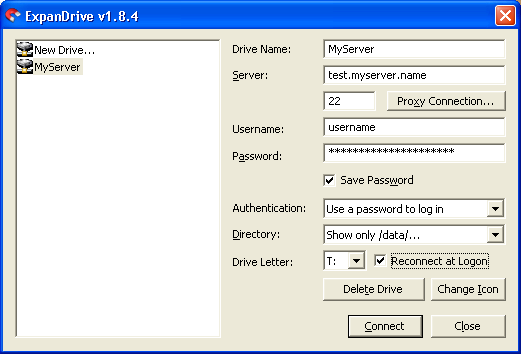
It is small, easy to install, and has all the features I need. It can save the password and reconnect after a connection drop (I tested it by unplugging the network cable and plugging it back in, and the program immediately restored my mapped drive), and it can connect to the server with a private key. And while data is being exchanged, a little magnet icon blinks nicely :-).
So right now I use the combination ExpanDrive + Robocopy. The Robocopy call looks like this:
robocopy T:\ E:\Data_from_Server\ /MIR
For now ExpanDrive runs in trial mode, and after Robocopy finishes it doesn’t send an email with the backup results, but this is already a good addition to the existing FreeBSD-to-FreeBSD backup.
Other programs I heard about or even tried:
Swish (Easy access to files over SSH/SFTP with Windows). It is free! After installation, Windows Explorer gets the ability to connect to a server over SFTP. I tried it: it connects to the server, and you can work with files almost as if they were on your own computer.
FTPDrive is a free program by a developer from Belarus. It emulates a virtual logical drive in which the specified FTP servers appear as first-level folders. It is useful, for example, for watching movies or listening to music straight from an FTP server without downloading. It has lots of settings.
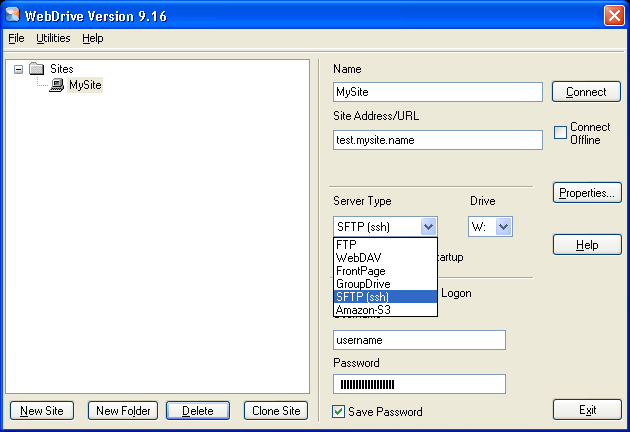
WebDrive connects server data as a drive over FTP, WebDAV, FrontPage, GroupDrive, SFTP (SSH), and Amazon S3. It is very similar to ExpanDrive but more expensive at $69.95 (it seems to me that for this kind of utility the price should be no more than $20!). The settings are logical and convenient.
Update: prices and versions here are from 2011. Today, instead of cwRsync you can use the OpenSSH client built into Windows 10/11, or rsync inside WSL, and SFTP drive tools like WinSCP or SSHFS-Win are free.
