How to Show Folder Sizes in Total Commander (Shift+Alt+Enter)
Total Commander is an excellent file manager that has long become a classic.
To see the size of every subfolder, you could press Space on each folder one by one — or use a keyboard shortcut or a dedicated toolbar button.
Show the size of all folders with a shortcut
Shift + Alt + Enter — calculate the size of all folders in the current panel |
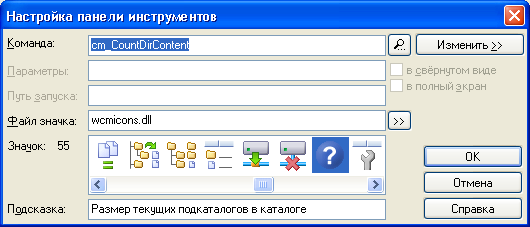
Or add a toolbar button
Create a new toolbar button with the internal command cm_CountDirContent. It calculates the sizes of all subfolders in the current folder.
Tip: Space on a single folder still works when you only need one folder’s size.


