How to Prune the Bitcoin Core Blockchain (-prune) to ~12 GB

One of the most common follow-up questions to my guide on speeding up Bitcoin Core sync is what to do when your drive simply cannot hold the entire transaction history. Back in 2017 the blockchain crossed 110 GB, and today a full archival node requires roughly 780 GB. Fortunately, the built-in solution is right inside the client – pruning mode (prune).
 A Bitcoin Core full node still validates every block without keeping the old raw files on disk
Since Bitcoin Core 0.14.0 (and in all modern releases), the client verifies the entire chain, records current balances in the unspent transaction output database (UTXO / chainstate), and automatically deletes older block files so disk usage stays minimal.
How Much Disk Space a Pruned Node Actually Uses
In the documentation, the minimum -prune=550 threshold only sets the cap in megabytes for old block files. On top of that, the client must keep the active UTXO set (chainstate, currently around 11 GB) plus index and wallet files. In practice, Bitcoin Core running with -prune=550 or -prune=600 uses roughly 12 GB total instead of ~780 GB.
Security-wise, your node still validates network rules and transactions just like an archival node and guards your keys the exact same way. The trade-off is that with -prune enabled you cannot turn on -txindex or run a full -rescan over blocks that have already been pruned.
How to Enable -prune Mode in Windows
You can turn pruning on in the GUI (Settings → Options → Prune block storage to … GB) or pass startup flags in the Windows shortcut for bitcoin-qt.exe.
If you use a shortcut, watch the quotation marks carefully whenever there is a space in the folder path (this tripped up quite a few readers in the comments): close the quotes right after bitcoin-qt.exe, then add flags outside the quotes separated by a space:
"C:\Program Files\Bitcoin\bitcoin-qt.exe" -datadir=D:\BTC -prune=600
If the path has no spaces, quotes are optional:
C:\Data\bitcoin\bin\bitcoin-qt.exe -datadir=store -prune=600
-datadir=D:\BTC: custom folder for block data andwallet.dat(without it, older versions use%appdata%\Bitcoin, while Bitcoin Core v28.0+ defaults to%localappdata%\Bitcoin).-prune=600: keep only the latest 600 MB of raw block files (minimum550;0disables pruning; switching back to unpruned later requires redownloading the whole blockchain).

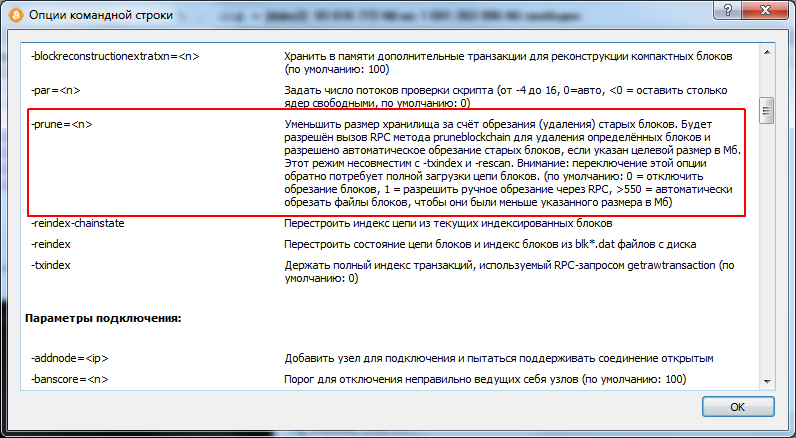 Description of -prune and -datadir options in Bitcoin Core help
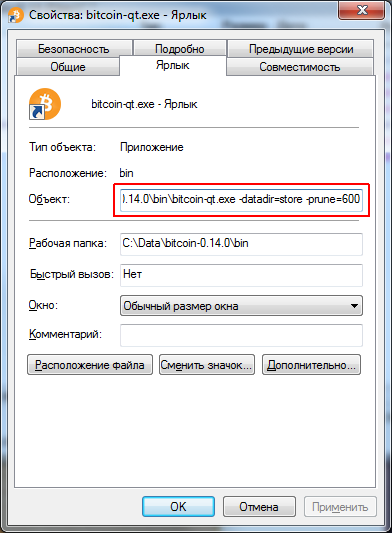 Target field in shortcut properties: flags go right after the exe path
Keep one more detail in mind: during the first sync with -prune=600, Bitcoin Core still downloads and checks the entire network history (~780 GB of traffic) – it simply discards old blocks as it goes so they do not pile up on disk. And if you only need to rescue funds from an old wallet.dat without downloading hundreds of gigabytes, back up your wallet file first and consider importing the keys into a lightweight wallet.
Where to buy Bitcoin. A pruned wallet holds your coins just as safely as an archival node. You can buy BTC on an exchange – for instance on Binance – and withdraw it to your own Bitcoin Core address.
Affiliate link to Binance. Crypto prices are highly volatile – only invest what you can afford to lose.