How to Make Windows 7 Search for Drivers on the Internet (Windows Update)
Windows 7 is a good system — beautiful and reliable, with a more convenient security and permissions model.
Among its nice features is good support for all sorts of hardware and the ability to automatically download drivers from the Microsoft store.
Searching for and installing drivers by hand is almost never needed now, because drivers for standard hardware are already included with the operating system or arrive through Windows Update.

Sometimes automatic driver search and installation from the internet happens only on request, or this option is turned off altogether. Then you need to know how to enable driver updates over the internet.
And I will show you how.
Solution: let Windows 7 search for device drivers online
Go to: Computer properties → Advanced system settings → Hardware → Device Installation Settings
Step by step with pictures:
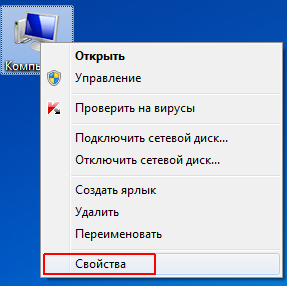

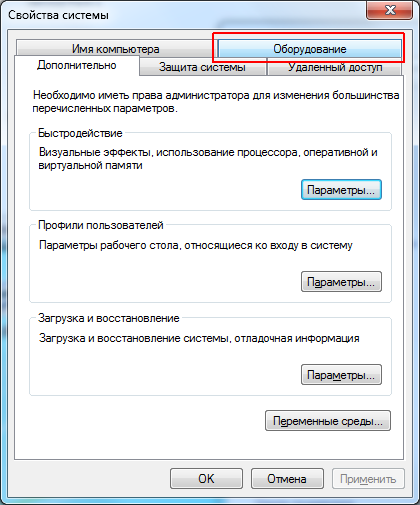
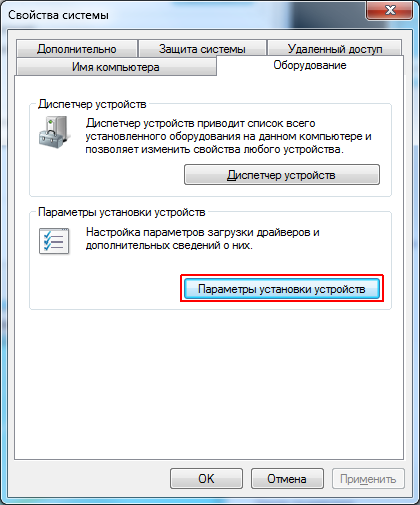

Choose the option to always install the best driver software from Windows Update — either automatically or on request.
As usual with Windows, everything is simple when you know where to look 
Note: Windows 7 is no longer supported by Microsoft. The same dialog exists in newer Windows versions too: open Control Panel → Devices and Printers, right-click your computer and choose “Device installation settings”.
