ACPI\ATK0110 Driver for Windows 7 and 10 (ASUS) — Download and Install
After a clean Windows 7 install most drivers are picked up automatically or arrive with Windows Update. But there is one device that usually stays unknown: ACPI\ATK0110.
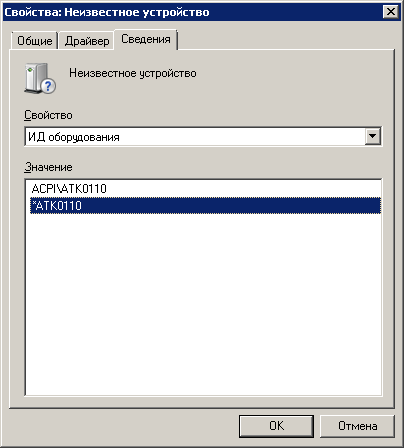
In my case the PC had an ASUS P5K PRO motherboard.
What is ATK0110?
ATK0110 is the ASUS ACPI utility device. It is found on ASUS motherboards and lets ASUS tools (AI Suite, PC Probe, EPU and similar) read sensors, fan speeds and voltages. Without the driver the PC works fine, but Device Manager shows an unknown device and ASUS utilities may not work.
Where to get the driver
The official source is the ASUS support page for your motherboard, usually in the Utilities section — look for “ATK0110 driver” or “ATK ACPI driver”.
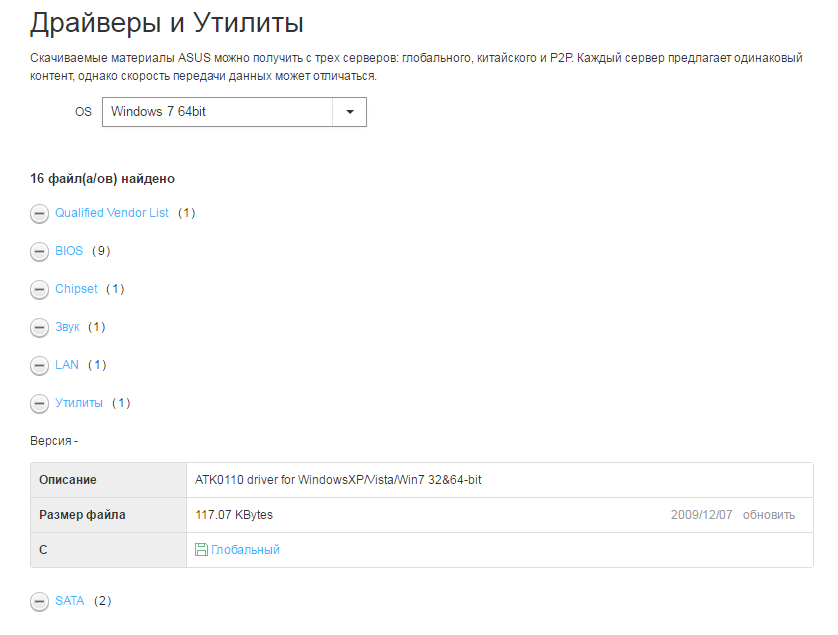
To save you the search, here is the package I used:
- MB_WIN7_ATK.zip (117 KB) — ASUS ATK0110 ACPI Utility 1043.6.0.0, for Windows 2000/XP/Vista/7, 32 and 64-bit. Taken for the P5K PRO, but it is the same generic ASUS driver for most boards of that era.
How to install
- Unzip the archive to a folder.
- Either run
AsAcpiIns.exefrom the32or64folder (matching your Windows), or install manually: - Device Manager → right-click the unknown device → Update driver → Browse my computer → point to the unpacked folder (tick Include subfolders).
Several readers confirmed that the manual method works when the installer does nothing.
Windows 10 and 11
On Windows 10/11 the ATK0110 device is usually installed automatically. If it isn’t, the Windows 7 driver from the archive above normally works too (use the 64\WIN7 folder on 64-bit Windows).
Tip: to find out which motherboard, CPU or video card you have, I use AIDA64 — the free trial is enough for that.


