How to Speed Up Bitcoin Core Synchronization – Practical Tips

Back in the day, I gave up on the classic desktop Bitcoin Core wallet more than once because of its painfully slow initial sync – especially from scratch after reinstalling Windows. Yet I always came back to it, because keeping coins in questionable online services is risky: once bitcoins are sent out, you cannot reverse the transaction.
 During initial sync, the main bottleneck is disk I/O and block verification
Below is what actually slows down bitcoin-qt.exe and how to speed up the initial blockchain download.
Why Sync Crawls: Disk Speed and Database Size
Watching bitcoin-qt.exe during Initial Block Download (IBD) shows that the bottleneck is almost always the storage drive. The client continuously verifies signatures and reads thousands of fragments of the UTXO set (chainstate), so on an old HDD the sync drags on for weeks even while a regular CPU and RAM sit at moderate load.
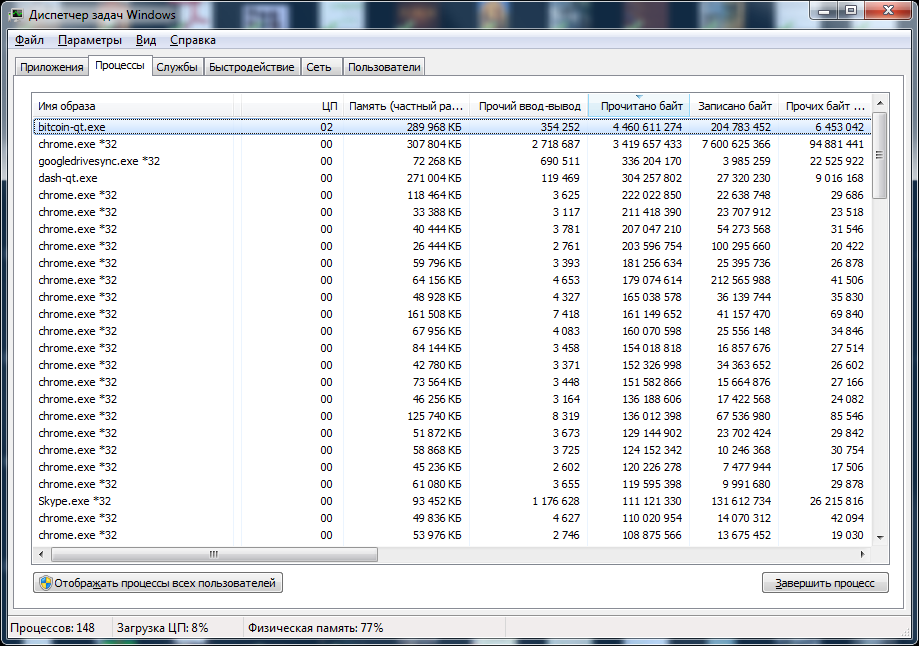 Resource usage on Windows 7 x64 (2015) – storage subsystem takes most of the hit
When I first wrote this note in September 2015, the entire Bitcoin Core blockchain was only 48.1 GB (Litecoin was 4.92 GB, Dogecoin 12.1 GB, Dash 1.34 GB), and a 120 GB SSD was plenty. Today a full archival Bitcoin node takes roughly 780 GB, so you will need at least a 1 TB SSD if you want the complete history.
How to Speed Up Bitcoin Core in Practice
- Put the data on a fast SSD: even a budget NVMe or SATA SSD speeds up
chainstatereads and writes dramatically compared to a spinning hard drive. - Increase the RAM cache (
-dbcache): if your PC has 16–32 GB of memory, launching with-dbcache=4096(or higher) cuts disk writes during sync several times over. - Use pruning mode (
-prune): if you do not need all 780 GB of old block history, enable Bitcoin Core blockchain pruning so the node only needs about 12 GB of disk space. - Always exit cleanly: never kill the process from Task Manager or hit the power button, or the next launch may trigger a slow
reindexcheck that pushes CPU usage too. - Copy your own folder across PCs: you can copy the synced data directory from another trusted machine of yours (or point a fresh Windows install to the existing folder with
-datadir), just avoid downloading random blockchain archives from torrents or forums.
If You Only Need Coins from an Old wallet.dat
People often ask in the comments what to do if they just need to move funds out of an old wallet.dat without waiting for hundreds of gigabytes to download. Make a backup copy of wallet.dat first, check the addresses or open it in an up-to-date Bitcoin Core client, or sweep/export keys to a lightweight wallet like Electrum downloaded strictly from the official website.
Where to buy Bitcoin. Bitcoin Core only stores coins. You can buy BTC on an exchange – for example on Binance – and withdraw it straight to your own wallet address so you control the keys.
Affiliate link to Binance. Crypto prices are highly volatile – only invest what you can afford to lose.