ven_8086&dev_29b4 Driver for Windows 7 64-bit (Intel MEI) — Download
For a long time my 64-bit Windows 7 had an unknown device in Device Manager. It didn’t really bother me, and I couldn’t find the driver quickly, so I left it.
Eventually it was time to sort it out.
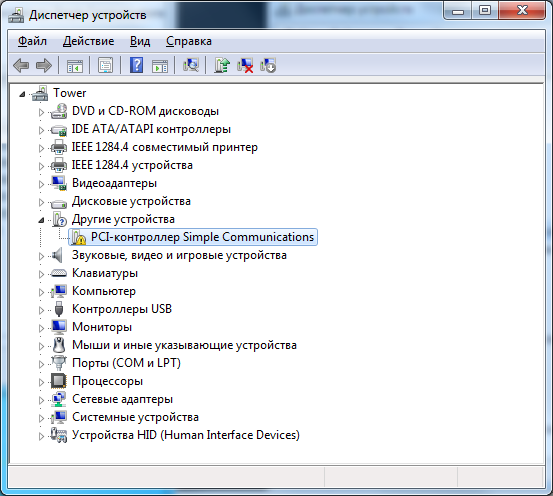
In Device Manager the hardware ID is ven_8086&dev_29b4.
The setup
System: Windows 7 64-bit
Motherboard: Intel DQ35MP
Needed: a driver for the PCI Simple Communications Controller with ID ven_8086&dev_29b4
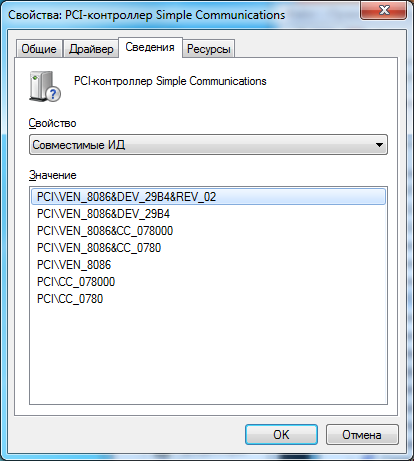
What this device is
VEN_8086 is Intel, and DEV_29B4 is the Intel Management Engine Interface (HECI) of the Intel 3 Series chipset (Q35/G33/P35). “PCI Simple Communications Controller” is simply what Windows calls the MEI until it has a driver.
Download the driver
You need the Intel ME driver (Management Engine Driver for Intel 3 Series Chipset-Based Desktop Boards):
MEI_v3.2.50.1059.exe (1.7 MB)
For Windows XP, Vista and Windows 7 (32 and 64-bit).
After installing it, everything is fine and there are no more unknown devices.
If your DEV is different
The same “PCI Simple Communications Controller” on newer boards is also Intel MEI, just a different generation. Look for the “Intel Management Engine Interface” driver for your exact model on your PC or motherboard maker’s support site. On Windows 10/11 it is usually installed automatically through Windows Update.


