ASUS Anti-Surge: What It Is and Why Your PC Shuts Down
Many Asus motherboards have a feature called Anti-Surge.
Anti-Surge is an ASUS technology that protects the motherboard and expensive components from power supply voltage spikes: it monitors the voltages and shuts the PC down if they go out of range.

It’s a useful thing: in my case it worked exactly as it should and told me in time that the power supply needed replacing.
Symptom: the PC turns itself off
The PC had been running fine for almost a year. Then one evening it started switching off on its own. No blue screens, no crashes — it just calmly powered off. The usual suspects are:
- the power supply;
- an overheating chipset or CPU.
The configuration:
Asus H61M-E motherboard;
Intel Pentium G2130 3.2 GHz;
8 GB DDR3 1600 MHz;
integrated graphics;
60 GB Silicon Power drive;
Golden Field ATX-S460 power supply.
Nothing fancy — a decent office PC, not a gaming rig. Overheating was unlikely: the stock Intel box cooler with its factory thermal paste lasts a long time, and there was little dust inside.
That left the power supply. Golden Field PSUs are decent, inexpensive, quiet and don’t break often. Opening a new PSU under warranty (usually 1 year) is a bad idea — you lose the warranty. Mine had one month of warranty left.
Checking voltages in the BIOS
I went into the BIOS and saw 5.52 V on the 5 V rail. That’s not within spec — it’s in the red zone.
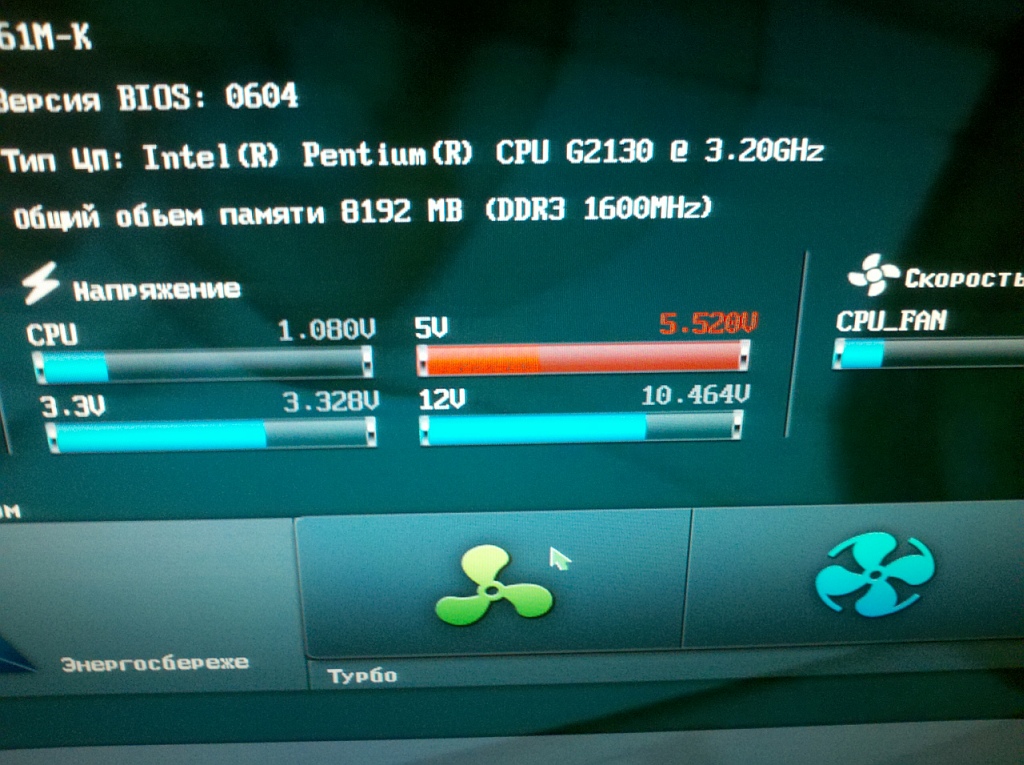
The ATX standard allows ±5%: for the 5 V rail that’s 4.75–5.25 V, for 12 V it’s 11.4–12.6 V, for 3.3 V it’s 3.14–3.47 V.
Anti-Surge monitors these values and shuts the PC down!
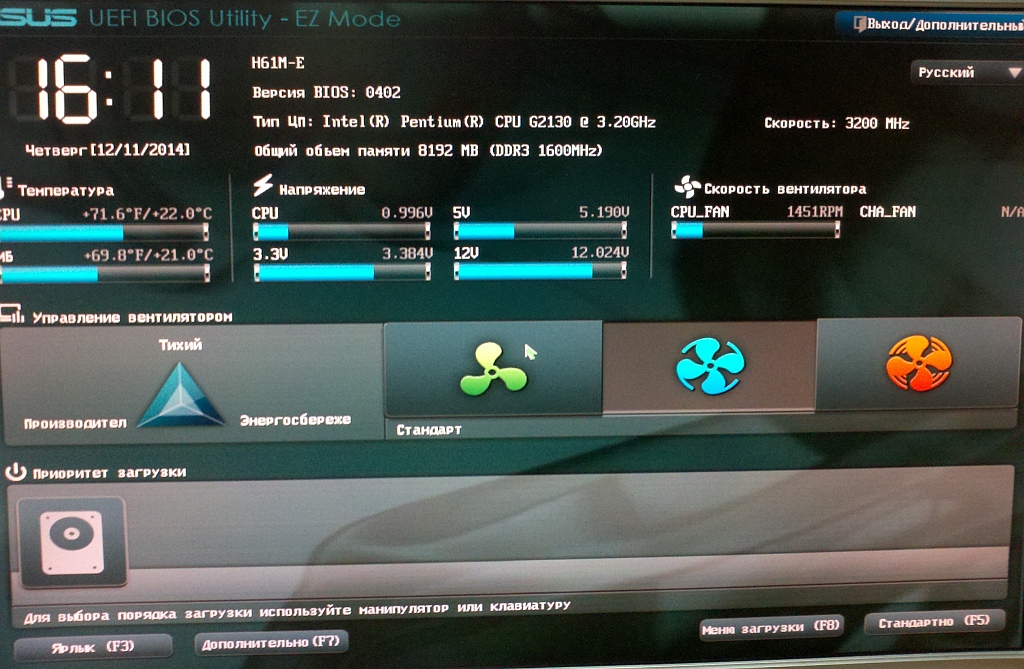
And this is what the voltages look like on a healthy PC:
As an experiment I disabled Anti-Surge — the PC turned on and worked. But that’s no solution: run like this, something will eventually fail. Disabling Anti-Surge to stop the shutdowns is a bad idea — it treats the symptom, not the cause.
Getting the PSU replaced under warranty
I took the power supply out, put in another one, and checked the faulty one with a multimeter — the 5 V rail really was out of spec.
I put it in a bag with the warranty card and took it to the service center of the shop where I bought it. They looked it over and accepted it. About 20 days later they called: come and pick up the replacement.
The Golden Field ATX-S460 was replaced with an identical new one!
Asus Anti-Surge helped prevent problems with the PC and let me use the warranty in time.


