The IT world keeps moving: software versions grow and new features keep appearing. Remote control is no exception — classic RDP and Radmin, the popular TeamViewer, the free LiteManager (up to 30 licenses) and plenty of other programs. Recently another one appeared, with an interesting feature — very fast screen transfer. It’s called AnyDesk.

Speed isn’t AnyDesk’s only advantage, and for now the program is completely free.
Read full article →
It is an annoying classic: a PDF file looks completely fine on your screen, yet the moment you hit Print, Adobe Reader throws an error (“The document could not be printed”) or the printer spits out a blank sheet.

The culprit is almost always inside the PDF itself – malformed embedded fonts, complex transparency layers, or a PostScript/PCL hiccup in the printer driver. Buying Adobe Acrobat Pro just to repair a one-off document makes no sense; here are four fast fixes that work in under a minute.
Read full article →
While most operating system installers come as .iso files, many server, router, and embedded distributions – including FreeBSD (memstick.img), OpenWrt, pfSense, OPNsense, Raspberry Pi OS, Home Assistant, and diagnostic tools like MemTest86 – are distributed as raw sector-by-sector disk images with an .img extension.

Trying to unpack or burn a raw .img file with traditional ISO extractors like PowerISO or UltraISO usually leaves you with a drive that will not boot. An .img file must be written directly to the USB stick byte-for-byte.
Read full article →
Cloud technology is gradually becoming part of our lives: we’re no longer surprised by Gmail or Facebook. And not that long ago a hard drive was 1.7, 4.3 or 6.4 GB :-)

Now anyone can store their data in the cloud, and encrypted too. But free plans usually give little space — 2–5 GB — and for more you have to invite friends or pay. The famous Kim Dotcom has made a secure storage service, Mega, with 50 GB free!
Today MEGA gives 20 GB for free. Which other services give free space and how to get 50 GB or more without paying — see Free Cloud Storage 50 GB.
Read full article →
CMS (Central Management System) is a Windows desktop client for viewing cameras and managing DHxxx and DU series DVR video recorders (Dynacolor platform) over a local network or the internet. Unlike legacy ActiveX browser plugins that no longer run in modern Chrome or Edge, CMS works reliably as a standalone Windows app.
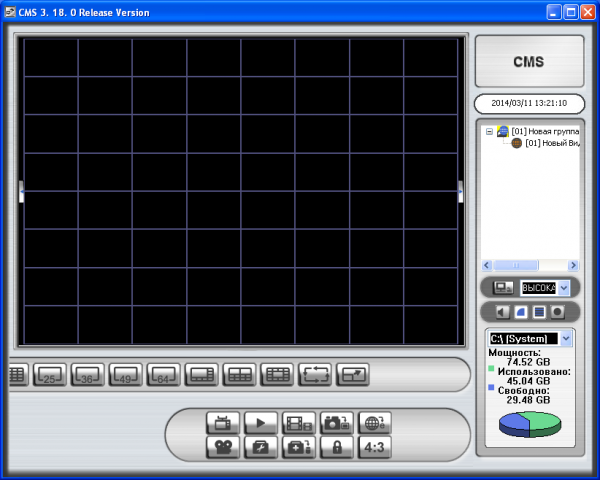
Quick answer: download CMS 3.24 (67 MB) or CMS 3.18 (35 MB) for free below. Default login is admin, password 1234. Since Dynacolor’s official FTP server has been shut down for years, I keep working copies hosted right here.
Read full article →