Sometimes the sheet switching buttons — the tabs at the bottom of the window — disappear in Excel.
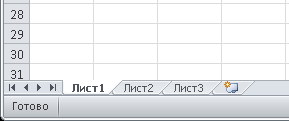
In short: turn on “Show sheet tabs” in Excel’s options. If it’s already on, drag the left edge of the horizontal scroll bar to the right — the tabs may simply have been squeezed out of view.
Read full article →
I was asked to help with a file called invite.ics. It turns out to be a calendar file, and it opens in Google Calendar, Outlook, Mozilla Sunbird and other calendar apps.
In short: invite.ics is an invitation to a meeting or event in the iCalendar format. It comes by email along with the invitation. Double-click the file to open it in Outlook or the Windows calendar, or import it into Google Calendar as shown below.

To avoid installing anything special, I decided to use what I already had at hand, which is of course Google Calendar.
Read full article →
When a website looks broken after an update, buttons stop responding, or a login page keeps looping, clearing the browser cache is still the fastest first step. Better yet, you don’t even have to hunt through nested menus – two keyboard shortcuts cover nearly every browser.

Before wiping your entire browser cache, try refreshing just the stubborn page first so you don’t lose cached assets for sites that work fine.
Read full article →
To pinpoint an exact spot on Google Maps that has no street address – like a trailhead, a beach, or a GPS waypoint – simply type its coordinates straight into the Google Maps search bar: latitude first, then longitude, separated by a comma.

A fun way to test it right now is typing 52.376552, 5.198303 into Google Maps. Years ago, that exact wooden dock in Almere, Netherlands went viral online because viewers were convinced a satellite had caught a “murder scene”.
Read full article →
Total Commander is an excellent file manager that has long become a classic. But there is one thing it doesn’t show by default: folder sizes. The Size column just says <DIR> for folders.
In short: press Shift+Alt+Enter and Total Commander calculates and shows the size of every folder in the current panel at once. It’s the internal command cm_CountDirContent, and you can put it on a toolbar button too.
To see the size of every subfolder, you could press Space on each folder one by one – or use a keyboard shortcut or a dedicated toolbar button.
Read full article →
