Remote Desktop (RDP) is a convenient way to access a work or home PC over a local network or VPN. You can turn it on from Windows Settings, though enabling it from the Windows Command Prompt or with a ready-to-run .cmd script (launched as administrator) is faster and much more reliable across machines.
Remote Desktop (RDP) can be enabled with three commands in cmd without digging through system menus
These steps were tested on Windows 10 and Windows 11 Pro, Enterprise, and Education (Windows Home editions do not include the RDP host service by default), and the same commands also work on Windows 7, 8, and Windows Server.
When attempting to install a cumulative update or a security patch via Windows Update on Windows 10 or Windows 11, the process may suddenly halt and throw error 80092004 (full hex code: 0x80092004). The update downloads, progresses to a certain percentage, and then fails.
Windows Update failure with error 0x80092004 in Windows 10 and 11
Quick Answer: The code 0x80092004 stands for CRYPT_E_NOT_FOUND (“Cannot find object or property”). It indicates that Windows could not locate or verify the cryptographic digital signature of the update package. In most cases, the culprits are insufficient disk space on drive C to extract setup files, corrupted .NET Framework manifests, or a damaged update cache. Below are the verified solutions arranged from the simplest to the most comprehensive.
Sometimes on a Windows Remote Desktop (RDS / Terminal) server you need to grant an external contractor, accountant, or manager temporary RDP access for a couple of hours, then automatically log off their session and disable the user account – so you never forget to lock the door at the end of the day.
You can handle this in two ways: a simple admin script that enables a disabled account for N hours and locks it back up, or built-in Group Policy RDP session timeouts for regular users.
First, to avoid confusion: a shadow copy is not the same as System Restore in Windows 10’s System Protection. It’s a more useful tool for people who know what they’re doing.
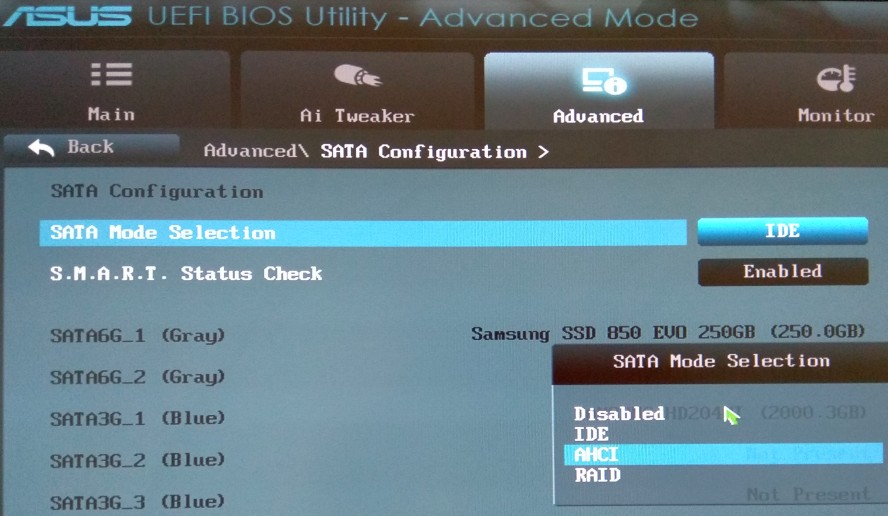
AHCI replaced the time-tested but outdated IDE controller mode. If, for whatever reason, your PC runs in the old IDE mode, you can easily switch the controller to the newer, more capable AHCI mode.
 Remote Desktop (RDP) can be enabled with three commands in cmd without digging through system menus