Windows 10 is a good operating system: fast, stable, and good-looking. But some things are tucked away from the average user so they don’t get in the way. A bit like macOS, only there it is much worse.
At some point I needed to raise the priority of one program. I noticed that when you minimize it, it starts working noticeably slower in the background.
Time goes by, Viber keeps updating and getting “heavier”, while old phones and ancient computers creak their gears and weep bitter tears.
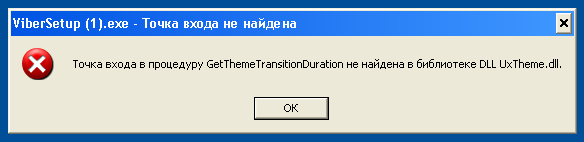
When installing the new Viber on Windows XP, I got this error: “The procedure entry point GetThemeTransitionDuration could not be located in the dynamic link library UxTheme.dll”.
In short: the regular Viber for Windows doesn’t support Windows XP. You need the separate Viber version for XP — its link was at the bottom of the Viber download page. Read full article →
I was installing the PostgreSQL ODBC driver (psqlodbc_09_05_0400-x64) on Windows 7 64-bit. Everything installed fine, and I set up the database connection.
But it turned out that 1C (an accounting system) uses a 32-bit driver, so I needed the x86 version of psqlodbc_09_05_0400. And after installing it, nothing new appeared in the ODBC window. Read full article →
Sometimes Windows XP needs to restore system files — and then it asks you to insert the installation CD to take the originals from it.
For convenience and speed, you can copy the installation files to the hard drive once and tell the registry where they are. Then you won’t need the CD anymore. Read full article →
Starting with Windows 10 and continuing in Windows 11, Microsoft removed the old Windows 7 “Never check for updates” toggle. Keeping security patches on is the right call for almost every home PC, yet there are work rigs, kiosks, and specialized setups where a surprise overnight reboot breaks an active job.
Here are 4 built-in ways to pause or stop Windows automatic updates – from gentle built-in scheduling to Group Policy, Registry, and service controls, with zero third-party tools.