How to Run 32-bit ODBC on Windows 7 64-bit (odbcad32.exe) When the Driver Isn’t Listed

I was installing the PostgreSQL ODBC driver (psqlodbc_09_05_0400-x64) on Windows 7 64-bit. Everything installed fine, and I set up the database connection.

But it turned out that 1C (an accounting system) uses a 32-bit driver, so I needed the x86 version of psqlodbc_09_05_0400. And after installing it, nothing new appeared in the ODBC window.
Why the 32-bit driver isn’t visible
64-bit Windows has two ODBC administrators, 64-bit and 32-bit, each with its own list of drivers and its own data sources (DSN). The usual Data Sources (ODBC) shortcut in Control Panel opens the 64-bit version, so a 32-bit driver isn’t shown there.
The rule is simple: the driver and DSN bitness must match the bitness of the program that connects to the database. A 32-bit program needs a 32-bit driver, regardless of the Windows bitness.
How to run 32-bit ODBC on Windows 7 64-bit
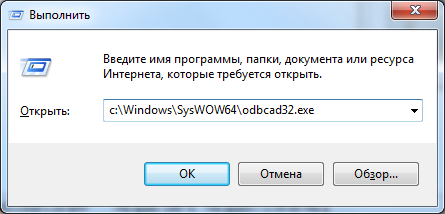
Press Win+R (or Start → Run) and run:
C:\Windows\SysWOW64\odbcad32.exe
Don’t mix them up: the file with the same name in C:\Windows\System32\odbcad32.exe is the 64-bit version (on 64-bit Windows, System32 holds 64-bit programs and SysWOW64 holds 32-bit ones).
The difference in screenshots
ODBC opened the standard way: Start → Control Panel → System and Security → Administrative Tools → Data Sources (ODBC) — this is the 64-bit version:

Running 32-bit ODBC:

The difference shows in the number of installed drivers: the PostgreSQL driver appeared in the 32-bit version.
Result
In 32-bit ODBC we set up the database connection using the x86 driver. Bingo! 1C connected to the PostgreSQL database and data exchange started.
On Windows 8 and Windows 10 you don’t have to look for the file manually: Administrative Tools has two separate shortcuts, ODBC Data Sources (32-bit) and ODBC Data Sources (64-bit).