OpenWrt: Automatic Daily Router Reboot with Cron
I have a TP-Link TL-WR842ND Wi-Fi router, and I flashed OpenWrt on it for more features and stability.

OpenWrt has lots of advantages and runs much more stably, but occasional hangs still happen — especially with 5–10 clients and long uptime on a UPS. A couple of times DHCP stopped handing out IP addresses, and a reboot fixed it. To avoid such glitches I decided to reboot the router automatically once a day.
Task: reboot the router automatically with the OpenWrt task scheduler (cron).
Solution
Open the router’s web interface (LuCI) → System → Scheduled Tasks and add a task to reboot every day at 7:05. Set your time zone correctly and check the router’s clock first (System → System).
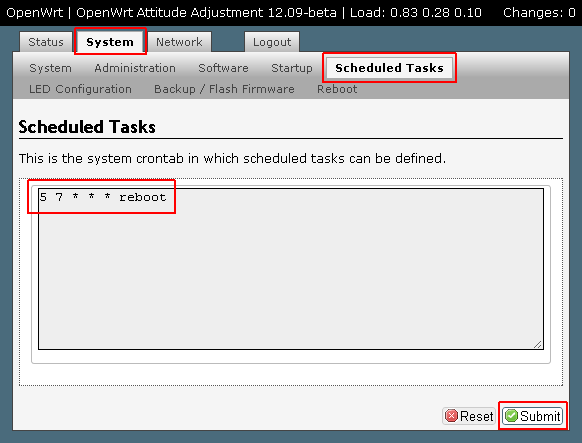
Add the line:
5 7 * * * reboot |
The fields are: minute, hour, day of month, month, day of week. So 5 7 * * * means 07:05 every day.
Click Save (or Submit in older versions) and reboot the router once so the cron service picks up the change.
Via SSH
echo '5 7 * * * reboot' >> /etc/crontabs/root /etc/init.d/cron enable /etc/init.d/cron restart |
Tip: with sleep 70 && touch /etc/banner && reboot instead of plain reboot you avoid a reboot loop if the clock jumps back after boot on routers without an RTC.
That’s it — now you can forget where the router even is 


