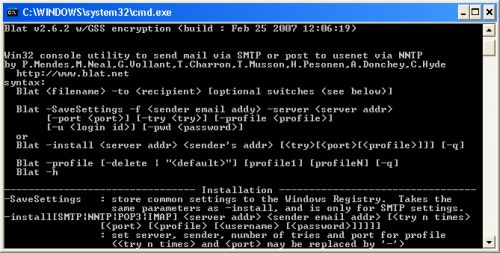
Sending automated emails from a Windows command line or batch script is a lifesaver for sysadmins: a nightly script finishes a backup, exports a database, or checks disk space and immediately emails the log report.
Below we cover both modern built-in ways to send email through Gmail on Windows 10/11 and Windows Server (using built-in curl.exe and PowerShell with zero third-party downloads) and the classic Blat + stunnel setup for legacy systems.
If your ISP’s DNS servers frequently lag, drop queries, or you want to host custom internal domain zones on a home or office PC, you can install a full-featured local caching DNS server – ISC BIND – on any Windows machine (from classic Windows XP Home/Pro to Windows 7 and Windows 10) in about ten minutes.
A local caching resolver stores IP addresses of visited domains directly in your computer’s RAM: the very first lookup to a new site takes the usual 20–50 ms, while every subsequent request to that domain resolves in 0–1 ms straight from 127.0.0.1 without waiting on external servers.
Today I ran into the network worm Net-Worm.Win32.Kido (also known as Conficker, Downadup, and Win32.HLLW.Shadow.based). On one of our servers, the Netlogon and Server services suddenly stopped, cutting off access to shared folders – something that had never happened before. I restarted the services and things came back up, but it was obvious something was off, so I started digging for the culprit.
Net-Worm.Win32.Kido (Conficker) targets unpatched Windows vulnerabilities
Kido affects Windows 2000, Windows XP, Windows Server 2003, Windows Vista, and newer builds, using a polymorphic packer that constantly changes its file signature and makes standard detection harder.
Most brand-new laptops and desktop PCs ship with Windows preinstalled on a single massive C: partition occupying the entire hard drive or SSD. Keeping your operating system, apps, family photos, and work archives lumped together on one partition is risky: it is far cleaner to reserve 100–150 GB on C: for Windows and programs while carving out the rest of the drive as a dedicated data volume D:.
You do not need to reinstall Windows or buy paid partitioning utilities like Acronis Disk Director to do this. Ever since Windows Vista – and across Windows 7, 10, and 11 – the built-in Disk Management tool lets you shrink C: and create a new partition in under a minute without losing any files.