Many people don’t use sleep mode, so they have no need for the usually huge hiberfil.sys file.
Sometimes the system drive starts running out of space, and this is a good place to free some up. But you can’t simply delete the file, because it is locked by the system.
I’ll show you how to get rid of hiberfil.sys easily and also turn off hibernation.
When you connect a modern hard drive or SSD to a computer running 32-bit Windows XP (or move a drive from an external USB enclosure or macOS system into Windows 7/10), opening Computer Management -> Disk Management often reveals a locked volume labeled GPT Protective Partition. The drive does not appear in File Explorer, and every option in the right-click context menu – including Delete Volume, Format, and Change Drive Letter and Paths – is completely grayed out.
This lock happens for one of two reasons: either the disk was initialized on a newer OS using the GUID Partition Table (GPT) layout – which 32-bit Windows XP and Windows Server 2003 cannot read – or the drive was removed from a USB bridge enclosure that emulated 4 KB logical sectors (4Kn) instead of native 512-byte sectors. To prevent older operating systems from thinking the disk is unallocated and accidentally overwriting it, the GPT specification places a protective dummy MBR entry across the entire disk that standard Disk Management refuses to touch.
Everything was fine until one day an optional Windows update was installed — new drivers for the HP LaserJet 1018. This was on Windows 7 x64, with the printer connected over the network. After the update the printer was visible, its status was Ready, we sent a document to print — and silence. Rebooting, removing and reinstalling the printer didn’t help.
Still, there is a way to get the printer working again: you need to completely remove the new driver, not just the printer itself. Read full article →
Office users and system administrators often encounter a baffling quirk in Windows 7 (and later Windows 8/10): desktop icons begin vanishing on their own overnight. Even stranger, local shortcuts stay untouched while shortcuts pointing to programs, databases, or shared folders on network drives and servers (paths like \\server\share\... or mapped drives like Z:\) – as well as shortcuts to removable USB drives – silently disappear.
This is not malware or an accidental press of the Delete key. The culprit is Microsoft’s built-in System Maintenance Troubleshooter. On a weekly schedule (typically early Wednesday morning or during idle time), Windows scans the desktop for broken links. If it finds more than 4 unreachable shortcuts at that moment – for instance, because a file server was rebooting, a laptop was booted at home off the office LAN, or a mapped drive had not reconnected yet – Windows assumes they are dead shortcuts and silently deletes them without sending them to the Recycle Bin.
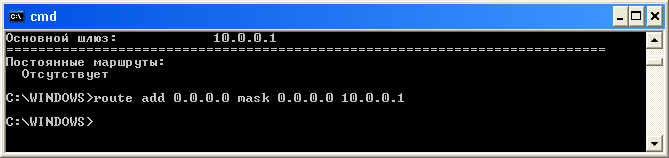
Sometimes you need to swap the default gateway on a Windows machine quickly – for example, routing traffic temporarily through another router, cutting internet access while keeping local LAN alive, or automating route switches in a script.
Doing it from an elevated Command Prompt or PowerShell window is far faster than digging through network adapter properties every time.