Windows Stuck at 640×480 Without a Monitor (TeamViewer) — HDMI Dummy Plug Fix
The situation: a PC with Windows 7 or newer and no monitor, with a modern graphics card such as the AMD Radeon RX 480. When you connect to it through TeamViewer, the screen resolution is only 640×480.
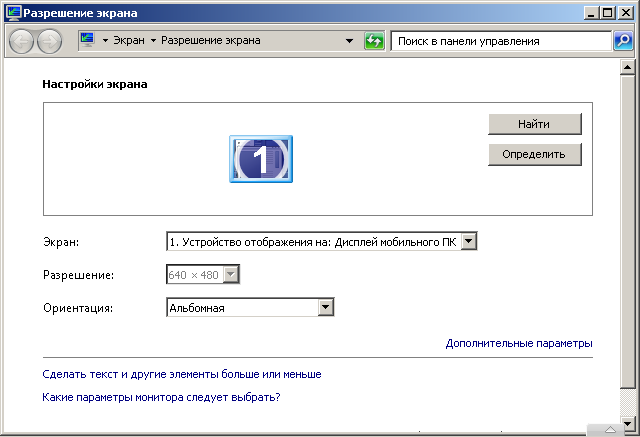
The low resolution is very inconvenient. Windows and dialogs with OK and Cancel buttons don’t fit on the screen, and it is almost impossible to do anything on the computer.
The interesting part is that older cards, such as the Radeon R9 380, don’t have this problem, and you can set any resolution you need. Perhaps it is a driver issue. Let’s look for a solution.
First I thought of various programs for controlling the system resolution, for example QRes and PowerStrip. They didn’t help; the operating system flatly refused to change the resolution.
Then I thought: what if I put the resolutions I need into the Windows registry? I found where 640×480 is stored, changed it, rebooted, and nothing happened. The resolution stayed at 640×480. I even tried to block the system from changing registry keys, but that was useless as well. Maybe I didn’t push hard enough and could have gone deeper, but then another thought came to me.
Fake monitor, virtual monitor for Windows 7. I started looking for software that creates a virtual monitor so I could move to it and leave the system one at a low resolution. That didn’t give me results either. I tried ZoneScreen and a few other programs.
I didn’t spend a lot of time on each of these methods, because I already knew three other solutions, and that nagged me.
Three ways to fix it
1. Connect a monitor, reboot, and everything will be fine.
2. Connect a dummy plug instead of a monitor. A dummy plug made of three 75-ohm resistors works only if you have a VGA output, and the RX 470 and 480 don’t have one: they have DVI and HDMI.
With DVI-A and DVI-I, you can plug in resistors directly or use a DVI-to-VGA adapter cable and put the resistors in it. But cards like the RX 470 and 480 only have DVI-D, and that doesn’t work with resistors. For DVI-D you need a chip.
You can simply buy an HDMI dummy plug (headless ghost adapter).

Such a plug costs from $5 in China.
3. Use an HDMI-to-VGA adapter. This is more universal and cheaper.

An HDMI-to-VGA adapter costs from $3. It is good because you can also connect an old monitor with a regular VGA input.
The bottom line is simple: three bucks and you’re done. There’s no need to torture the system and the graphics card drivers.
P.S. There is one more option: connect the board from an old monitor, but that’s for geeks 
